
Increase Student Engagement Using Classroom Response Systems
This post may contain affiliate links. As an Amazon Associate, I earn from qualifying purchases.
As teachers, we all know there is just not enough time in the day to grade every paper and have an accurate working knowledge of each student’s skills and needs. If you teach middle or high school, this becomes even more exaggerated with your number of students often reading into the hundreds. Additionally, keeping all of your students engaged and away from their daydreams is becoming an increasing challenge in the 21st century. There are few tools that can be used to increase student engagement through classroom response systems. The goal of all the tools that are highlighted below is to increase active engagement and provide real time assessment data for educators to use.
The Best Classroom Response Systems
Internet Based Platforms
Many school districts have chosen to enroll in subscription based services such as Nearpod or PearDeck to allow for live responses and interaction during lessons. These services will utilize internet connected devices, such as chromebooks. This is a great solution if your school already has 1:1 devices with internet access for students to use. Both Nearpod and PearDeck have the ability to use Google Slides or Powerpoint presentations and have interactivity added into the lesson. Educators just need to add in questions using the online platform. Students then log in using a code and students’ answers are tracked. These platforms allow teachers to ensure students are actively participating, while also storing the data for future analysis, and seeing which skills students are struggling with.
Nearpod can be too pricey for most teachers to purchase the full versions on their own, but their school or district-wide plans can include various lessons that are huge timesavers for teachers. Need a lesson on vowel blends for 2nd graders? Nearpod likely has one in their library and you can cue it up and be teaching in mere minutes.
PearDeck is working on creating a library of lessons as well, but they are not quite where NearPod is with lesson content. That said, the pricing plans for PearDeck are much more affordable. Additionally PearDeck integrates with the Google Suite of apps much more seamlessly than NearPod. If you have your lessons already created in Google Slides, this is a wise choice.
Both Nearpod and PearDeck allow teachers to create different question types, which is something you will not see with classroom Clickers or Plickers below. Drag and Drop, and drawing options are engaging and can provide a more in depth assessment of student knowledge.
Classroom Clickers
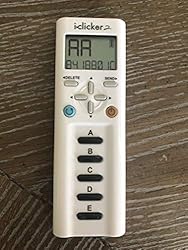

If your classroom does not have access to devices for each student, classroom clickers can be another great option, with just a one time cost. SMART Technologies (makers of SMART board) sell clickers that work seamlessly with their boards and softwares. There are also many other makers suchs as Turning Point, and iClicker. Most of the clicker brands on the market offer a few levels of clickers. Some include just 4 or 5 answer buttons for multiple choice answering, while some include numbers 1-10 or full keyboards. These systems are great for keeping students on task with minimal distractions. They are also mobile so students can be up around the room moving while using them.
The most challenging part of these products will be finding the product that works with your existing classroom 做啪啪啪视频. Most of the clickers are able to work on Macs and PCs and many also have mobile apps as well. The downside of most of the clickers is that they do not integrate with PowerPoint or GoogleSlides, leaving educators to correlate the questions and responses separately.
As 做啪啪啪视频 becomes more prevalent in the classroom, stand alone clickers are becoming less common, but still a great option in settings where distractions need to be limited, or you do not want students to have internet access while they answer.
Plickers
Lastly, the most low tech option (and the cheapest option) is a fun reponses system called Plickers. To use Plickers, teachers just need to make a free account on Plickers.com, create their classes and print out the cards from the Plickers website. Each student is assigned a number and then they use the Plickers cards to answer questions. The orientation that students hold their card up, shows what their answer is. Using a tablet or smartphone, teachers scan the classroom, and see live results. With just one device you can now make sure all students are engaged, and track their learning. Plickers also has a Pro version, that can be paid monthly or yearly, and includes more capabilities and storage of data.
In addition to being the cheapest option of the options that are listed here, it is also a great choice for assessments on the fly. Have students keep their plicker card in their notebooks and they can bring it out at any moment. Think you are losing some of them? Place a question on the board and get a response without any planning ahead. You just need to take your device out to see who is understanding the content.
Uses for Response Systems

Any of the choices listed here can provide two main benefits to your classroom. First off, they ensure every student is engaged and actively attempting to think through the lesson at hand. We have all had a student, who it seems does nothing all day. Student response systems put accountability on the student and provide you with valuable data on participation that can be used in student, parent, and support staff conversations. Secondly, they all provide you with real time data on all of your students. Without a student response system in your classroom, you are left to assess students manually, sucking up much of your time and energy that could be used elsewhere.
Regardless of the assessment choices you make in your classroom, the act of continually assessing students is what provides educators with the valuable knowledge that is needed to provide the highest quality education. Using the tools highlighted here, you can quickly identify which students are struggling and need more support, and which are ready to be challenged. With differentiation being the name of the game in the modern classroom, continual assessment is essential.

Kate is mom of two rambunctious boys and a self-proclaimed super nerd. With a background in neuroscience, she is passionate about sharing her love of all things STEM with her kids. She loves to find creative ways to teach kids computer science and geek out about coding and math. She has authored several books on coding for kids which can be found at Hachette UK.


